How Cotonti is building web pages, what are tags, themes and TPLs
You can think of Cotonti as a "dumb machine", it simply picks data from MySQL database and sends it to client (web browser) through a template engine, the "theme".
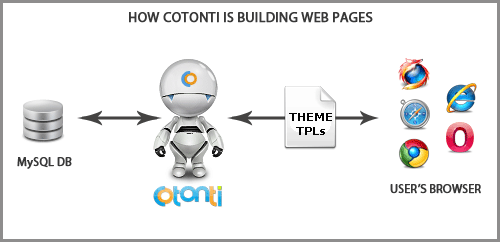
Theme — a set of files used to programm pages layout and its styling. style named xxx.tpl in folders inside /skins folder (for example: /themes/mytheme)
Template file (usually have .tpl extension) — a file made of simple HTML code, plus some placeholders named "tags"
Tag — special marked place holder to be substituted on templace parsing with some variable content. CoTemplate tags enclosed with curly brackets {}, and can be placed anywhere within HTML code, like this:
<a href="{PHP.cfg.mainurl}" title="{PHP.L.Home}">
	{PHP.L.Home}
	<span>Start here</span>
</a>
Nearly all pages (except popups) are built this way:
At the very beginning, Cotonti connects to the MySQL database, grabs some global data, loads the levels, the categories, statistics and perform a load of other actions. At this point nothing is sent to the client (your browser) yet.
Then it loads the file /system/header.php
This file mainly outputs the HTML code for the top of the website.
This is done through the TPL file : themes/…/header.tpl
Then the body of the page is loaded, and same as before, some HTML code is created for the middle of the page, still with a tpl file.
Then the file /system/footer.php is loaded.
It's outputing the HTML code for the bottom of the website.
And once again, this output is done through a TPL file : themes/…/footer.tpl
So a page is almost always made of 3 separate parts:
- The header (the top) : Always header.tpl
- The body of the page (the middle) : A file *.tpl
- The footer (the bottom) : Always footer.tpl
The body can be the the home page, the forums, an event, userlist, the administration panel, a plugin, etc.
Basically a "theme" is a set of TPL files, TPL stands for "templates".
A TPL file is made of HTML code, plus placeholders named "tags".
In almost all pages, the HTML send to the client browser is made of 3 TPLs, added one after the other, in this order :
For example, Cotonti will output the homepage using : header.tpl + index.tpl + footer.tpl
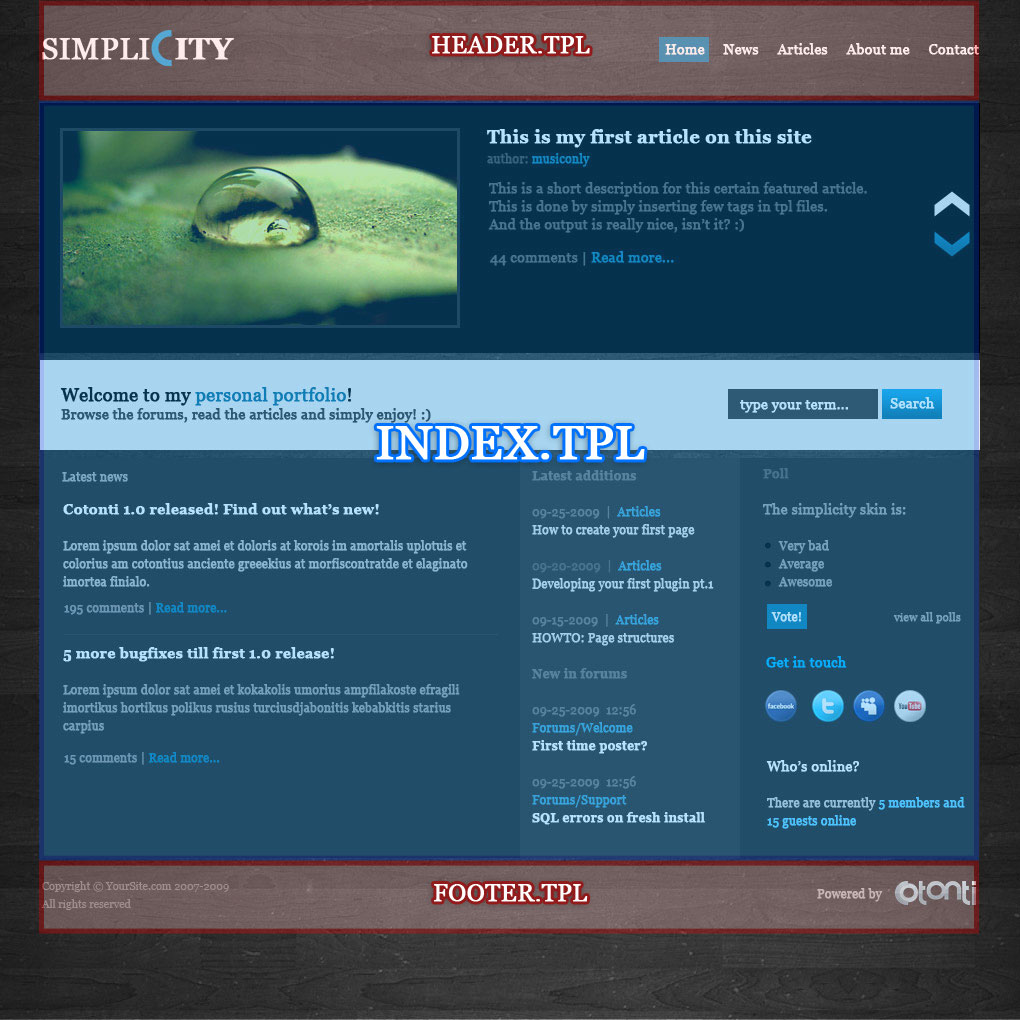
For the forums home it will be: header.tpl + forums.sections.tpl + footer.tpl
So if you plan to build your own theme, the fastest and easiest way is to go with an official development theme (i.e. Nemesis) and first start to tweak header.tpl, footer.tpl and the CSS file. By editing those only 3 files you can quickly get interesting results.
For some reasons, the popups for the ratings and the polls do not follows this, those standalone pages have their own header and footer in their main TPL file.
Tags are looking like this : {XXX_YYY}
In short, a tag is an object dynamically created by the PHP code, inside there're values such as strings, HTML code, URLs, pictures, etc.
Note: that tags that are not "global" will only work in a given TPL file. The name of the tag often tells where this tag is valid
(for example: tag {PAGE_XXX} will only work in page.tpl, {COMMENTS_XXX} will only work in comments.tpl and so on).
To see the list of tags available on the current page, append &tpl_debug=1 to the page parameters (more info about debuggin themes).
Global tags are a special kind of tags, valid in all skin files.
Most of the time, those tags are coming from PHP code variables, or from the configuration table, or from global plugins.
All global tags are looking like this : {PHP.tagnamehere}
For the complete list of global tags, you can insert a vardump for PHP tag in your template: {PHP|dump}. This feature is available since 0.9.1.
Sample, some fairly common global tags :
{PHP.cfg.adminemail}
{PHP.cfg.maintitle}
{PHP.cfg.mainurl}
{PHP.usr.name}
{PHP.usr.id}
{PHP.out.copyright}


or the complete list of global tags, you can insert a vardump for PHP tag in your template: {PHP|dump}. This feature is available since 0.9.1.
Explain plz..
Thanked: 263 times
Please wait a few days and try it in 0.9.1. It's easier to see than read an explanation of what it is and how it looks.
doh! I was to eager :p
Am I missing something or do the current themes that come with Siena pretty much ignore the tags you can set in the Menu Slots configuration page?
Thanked: 263 times
Right, they are unused in default theme because menu markup may change from theme to theme and we can't really rely on those configs by default.
Thanked: 102 times
Надеюсь мой перевод на русский поможет тем, кто только осваивает Cotonti. Если нужен перевод конкретных материалов сайта cotonti.com, - прошу писать в личку, с указанием ссылки на нужный материал